
 |
|
7 Great & Free Disney E-Cards Websites Posted: 09 May 2009 01:35 PM PDT
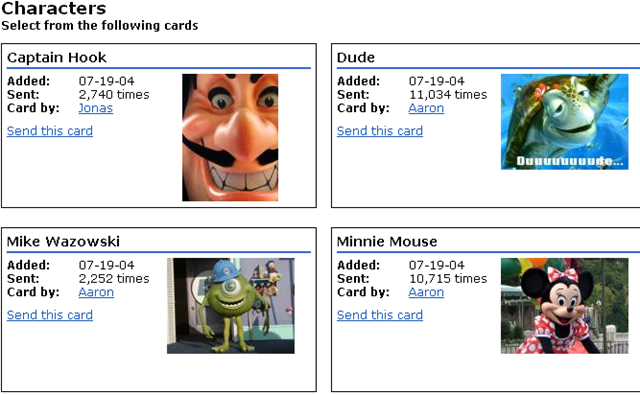
Seven of The Best Free Disney E-Cards Websites The following sites are all focused exclusively on Disney. There are Disney fans from around the world who’ve become obsessed with all things Disney, and many of these websites offer more than just free Disney email cards – they also offer things like clipart, forums, park or movie information and more. Most importantly, they let you send some of the coolest e-cards featuring Disney themes to anyone in the world. #1 – DisneySites This is one of sites that’s obviously created and run by a Disney fan. At DisneySites , you’ll find clipart, movie information, forums, park information and of course e-cards. On the page for the cards, I counted a total of 103 cards currently available, with my favorite being the 4 within the “characters” category.
These appear to be actual photos taken at the Disney Park itself, but they are high resolution and the cards are well laid out. You can even schedule when the card gets delivered by clicking on “Send Later on…” and entering the date. Just beware that the site does feature camouflaged Google Ads, so if you don’t want to mistakenly get transported to a commercial site, be wary of where you click. #2 – A Hidden Disney Gem: I-Love-Disney Easily one of the most obscure e-card sites on the Internet, I-Love-Disney is horribly designed and has a format that’s so busy and overrun with links that it’s nearly impossible to navigate. With that said, if you can find the email cards section, you’ll agree that this site is easily the one free Disney e-cards websites you’ll come across with a huge volume of great Disney graphics.
There are pros and cons to using this site. The animated graphics are cool, but the site isn’t automated. You need to copy the image itself and paste it into an email, so there’s no fancy formatting or form that will send the card for you. On the flip side, there’s a feature to select from dozens of languages across the world, and again, the selection of graphics is impressive. #3 – The eCards Disney Widget While I normally wouldn’t include a site like this on a top ten list, only because there’s not a whole lot that sets it apart from the thousands of other e-card sites on the net, except there is one pretty cool marketing tool that the creator of eCards.ac used that’s fairly useful – a Disney E-card Widget that you can place on your website to offer your visitors access to these free cards.
The widget is hosted and offered at WidgetBox . Keep in mind that the designs are decidedly “feminine,” so if you’re looking for manly Disney e-cards (if there’s such a thing), you may want to skip this site. However, if you’re into soft and flowery graphics, you’ll have a field day with these free Disney e-cards. #4 - Lilo & Stitch E-Cards With just about every form of media, few people can pull it off as well as Disney. This makes sense given the sheer resources available to the media design teams. However, there’s something above-and-beyond when it comes to Disney’s own offerings, and Disney websites are no exception. The Lilo & Stitch section of the Disney Channel’s website offers kids (and maybe the kid-at-heart) some pretty cool “digital post cards” that they can send to a friend.
The offerings are a bit slim. I count about five to seven, but the designs are very cool and a few of them are animated as well. #5 – Mission Space Digital Postcards If this top 10 list was in order of coolness, I would place the website for Mission Space at the very top. That may only be because I’m a bit biased as I love all things related to space, but the graphics and sound effects on this website are excellent.
The link for the digital postcards you can send to friends is found at the lower left hand corner of the page, if you can get past all of the other awesome stuff download – like screensavers, wallpapers and even posters. #6 – Pirates of the Caribbean, Dead Man’s Mail The site for the movie Pirates of the Caribbean easily competes with the Mission Space site for first place. On this site you can actually send free voice e-mail messages using a pirate voice. When you first enter the site, you can choose from one of four languages – English, Dutch, Italian or Spanish.
This is honestly one of the coolest e-card sites I’ve found on the net, and for the geeks out there, you’ve got a choice between text-to-speech technology, using a phone, or using pre-recorded selections. Keep in mind that this site is very heavy on the Flash side, so make sure you’re fully updated or it won’t work. #7 – Home on The Range Digital Postcards Finally, for fans of the Disney movie Home on the Range, there’s the movie website on Disney.com where, if you click on “games & downloads,” you can select from and send your friends a free digital postcard featuring one of the movie’s goofy characters.
Oh, and when you’re visiting most of these official Disney sites, really crank up the volume if you want to fully enjoy the experience. Do you know of any other fun or interesting Disney themed e-card websites out there? Share your own favorite sites in the comments section below. New on MakeUseOf ? Get cheat sheets, cool PDF guides and more @ www.makeuseof.com/makeuseof-downloads/ Categorized under: ecards, emails, wishesRelated posts
     
 |
|
|

Hey now I maintain this patch of cyber real estate primarily to share links and the occasional tech tip with friends
Sunday, May 10, 2009
7 Great & Free Disney E-Cards Websites






Saturday, May 9, 2009
onverticious is an intuitive unit con...
From the folks at Make Use of dot com
Converticious is an intuitive unit conversion app using which you can quickly convert temperature, volume, distance, weight, area and speed units online. The application has a clutter free and user-friendly interface. To convert, simply go to the site, chose what you want to convert, type in a value, select the units and then click on the “Convert” button. That’s it!

Features:
- Online unit conversion tool.
- Convert temperature, volume, distance, weight, area and speed units (more units and convention options are coming).
- Clutter free and user friendly interface.
- No sign up and free.
- Similar apps: Unit Converter, ConvertCenter and ConvertWorld.
Sunday, May 3, 2009
MakeUseOf.com
MakeUseOf.com |  |
Two Free Apps To Sync ANY MP3 Player with iTunes Posted: 03 May 2009 03:00 PM PDT Apple products are generally more expensive than their competitors. Although the overall user experience of Apple products is better, most people are price sensitive. Which means Creative, Sandisk and the likes still have about 20% of the MP3 player market share. For those of you who doesn’t have an iPod but use iTunes as their main music player we found two free apps which can be used to sync iTunes with almost any non-Apple MP3 player. iTunes AgentiTunes Agent, a project released under the GPL license by Jaran Nilsen and Justin Katz, is available fromSourceforge. The developers say it allows users to sync any MP3 player with iTunes as long as it has the ability to be connected to computer as a USB drive. It can be and MP3 player or even mobile phone. Configuring iTunes Agent is simple. All the necessary settings are presented in one window and are obvious even to a non-tech savvy person. You can associate the MP3 player with one playlist from iTunes, either normal or smart. Choosing a smart playlist will enable you to refresh songs automatically every time you plug the device in. For instance, associating your MP3 player with some smart “Shuffle” playlist will always put new song collection on your player. After choosing the device, music folder and associating that with a playlist you’re ready to right click on the notification area icon and select ‘Syncronize devices’. A dialog box will appear with information about the file operations being conducted. iTunes Agent recreates the iTunes folder structure on the MP3 player; Music>Artist>Album. Be careful, because some older MP3 players don’t support going more than 2 levels deep. While testing the current version of iTunes Agent, I never encountered a crash or hang, and the file transfer completed successfully in a short time. iTunes SynciTunes Sync, a program from John Tackabury of Binary Fortress Software, isn’t licensed under the GPL but provides a simpler configuration panel, automatic updates, translations into Spanish and German and a slightly better looking notification area icon. Both programs tested are free, work with iTunes 8 and require .NET Framework 2.0, which is available for free from Microsoft Update. Do you know other solutions for syncing MP3 players (other than iPod) directly with iTunes? Have you used one of these programs? Let us know in the comments. |


MakeUseOf.com
MakeUseOf.com | |
Two Free Apps To Sync ANY MP3 Player with iTunes Posted: 03 May 2009 03:00 PM PDT Apple products are generally more expensive than their competitors. Although the overall user experience of Apple products is better, most people are price sensitive. Which means Creative, Sandisk and the likes still have about 20% of the MP3 player market share. For those of you who doesn’t have an iPod but use iTunes as their main music player we found two free apps which can be used to sync iTunes with almost any non-Apple MP3 player. iTunes AgentiTunes Agent, a project released under the GPL license by Jaran Nilsen and Justin Katz, is available fromSourceforge. The developers say it allows users to sync any MP3 player with iTunes as long as it has the ability to be connected to computer as a USB drive. It can be and MP3 player or even mobile phone. Configuring iTunes Agent is simple. All the necessary settings are presented in one window and are obvious even to a non-tech savvy person. You can associate the MP3 player with one playlist from iTunes, either normal or smart. Choosing a smart playlist will enable you to refresh songs automatically every time you plug the device in. For instance, associating your MP3 player with some smart “Shuffle” playlist will always put new song collection on your player. After choosing the device, music folder and associating that with a playlist you’re ready to right click on the notification area icon and select ‘Syncronize devices’. A dialog box will appear with information about the file operations being conducted. iTunes Agent recreates the iTunes folder structure on the MP3 player; Music>Artist>Album. Be careful, because some older MP3 players don’t support going more than 2 levels deep. While testing the current version of iTunes Agent, I never encountered a crash or hang, and the file transfer completed successfully in a short time. iTunes SynciTunes Sync, a program from John Tackabury of Binary Fortress Software, isn’t licensed under the GPL but provides a simpler configuration panel, automatic updates, translations into Spanish and German and a slightly better looking notification area icon. Both programs tested are free, work with iTunes 8 and require .NET Framework 2.0, which is available for free from Microsoft Update. Do you know other solutions for syncing MP3 players (other than iPod) directly with iTunes? Have you used one of these programs? Let us know in the comments. |
MakeUseOf.com
MakeUseOf.com | |
Two Free Apps To Sync ANY MP3 Player with iTunes Posted: 03 May 2009 03:00 PM PDT Apple products are generally more expensive than their competitors. Although the overall user experience of Apple products is better, most people are price sensitive. Which means Creative, Sandisk and the likes still have about 20% of the MP3 player market share. For those of you who doesn’t have an iPod but use iTunes as their main music player we found two free apps which can be used to sync iTunes with almost any non-Apple MP3 player. iTunes AgentiTunes Agent, a project released under the GPL license by Jaran Nilsen and Justin Katz, is available fromSourceforge. The developers say it allows users to sync any MP3 player with iTunes as long as it has the ability to be connected to computer as a USB drive. It can be and MP3 player or even mobile phone. Configuring iTunes Agent is simple. All the necessary settings are presented in one window and are obvious even to a non-tech savvy person. You can associate the MP3 player with one playlist from iTunes, either normal or smart. Choosing a smart playlist will enable you to refresh songs automatically every time you plug the device in. For instance, associating your MP3 player with some smart “Shuffle” playlist will always put new song collection on your player. After choosing the device, music folder and associating that with a playlist you’re ready to right click on the notification area icon and select ‘Syncronize devices’. A dialog box will appear with information about the file operations being conducted. iTunes Agent recreates the iTunes folder structure on the MP3 player; Music>Artist>Album. Be careful, because some older MP3 players don’t support going more than 2 levels deep. While testing the current version of iTunes Agent, I never encountered a crash or hang, and the file transfer completed successfully in a short time. iTunes SynciTunes Sync, a program from John Tackabury of Binary Fortress Software, isn’t licensed under the GPL but provides a simpler configuration panel, automatic updates, translations into Spanish and German and a slightly better looking notification area icon. Both programs tested are free, work with iTunes 8 and require .NET Framework 2.0, which is available for free from Microsoft Update. Do you know other solutions for syncing MP3 players (other than iPod) directly with iTunes? Have you used one of these programs? Let us know in the comments. |
MakeUseOf.com
MakeUseOf.com | |
Two Free Apps To Sync ANY MP3 Player with iTunes Posted: 03 May 2009 03:00 PM PDT Apple products are generally more expensive than their competitors. Although the overall user experience of Apple products is better, most people are price sensitive. Which means Creative, Sandisk and the likes still have about 20% of the MP3 player market share. For those of you who doesn’t have an iPod but use iTunes as their main music player we found two free apps which can be used to sync iTunes with almost any non-Apple MP3 player. iTunes AgentiTunes Agent, a project released under the GPL license by Jaran Nilsen and Justin Katz, is available fromSourceforge. The developers say it allows users to sync any MP3 player with iTunes as long as it has the ability to be connected to computer as a USB drive. It can be and MP3 player or even mobile phone. Configuring iTunes Agent is simple. All the necessary settings are presented in one window and are obvious even to a non-tech savvy person. You can associate the MP3 player with one playlist from iTunes, either normal or smart. Choosing a smart playlist will enable you to refresh songs automatically every time you plug the device in. For instance, associating your MP3 player with some smart “Shuffle” playlist will always put new song collection on your player. After choosing the device, music folder and associating that with a playlist you’re ready to right click on the notification area icon and select ‘Syncronize devices’. A dialog box will appear with information about the file operations being conducted. iTunes Agent recreates the iTunes folder structure on the MP3 player; Music>Artist>Album. Be careful, because some older MP3 players don’t support going more than 2 levels deep. While testing the current version of iTunes Agent, I never encountered a crash or hang, and the file transfer completed successfully in a short time. iTunes SynciTunes Sync, a program from John Tackabury of Binary Fortress Software, isn’t licensed under the GPL but provides a simpler configuration panel, automatic updates, translations into Spanish and German and a slightly better looking notification area icon. Both programs tested are free, work with iTunes 8 and require .NET Framework 2.0, which is available for free from Microsoft Update. Do you know other solutions for syncing MP3 players (other than iPod) directly with iTunes? Have you used one of these programs? Let us know in the comments. |
Blue Screen of Death Survival Guide: ...
Blue Screen of Death Survival Guide: Every Error Explained
Posted 05/01/09 at 11:30:00 AM | by Paul Lilly
|
|
Picture this: It’s late at night, you’re sitting at your computer playing a game or working on a project when, suddenly, Windows freezes completely. All your work is gone, and you find a blue screen full of gibberish staring back at you. Windows is dead, Jim, at least until you reboot it. You have no choice but to sigh loudly, shake your fist at Bill Gates and angrily push the reset button. You’ve just been visited by the ghost of windows crashed: the Blue Screen of Death.

Also known as the BSoD, the Blue Screen of Death appears when Windows crashes or locks up. It’s actually a Windows “stop” screen, and is designed to do two things: tell you the reason for the error, and to calm your nerves, hence the use of the color blue (studies show it has a relaxing effect on people). Though Blue Screens are difficult to decipher, all the information you need to figure out what caused it is right there in front of you in blue and white—and that’s where we come in. We’re going to show you how to dissect the blue screen error details, so you can fix the problem that’s causing them.
BSoD 101: A Crash Course

Error Name
There are many parts to a BSOD, but the most important is right at the top. The actual name of the error is presented in all caps with an underscore between each word. In some cases this will be all that’s needed to get to the root of the problem (thanks to the handy guide you are about to read). Most of the time, however, more information will be required.
Troubleshooting Advice
Nearly every BSOD includes a portion of text with some basic troubleshooting advice, the first of which recommends restarting your computer. Gee, thanks for the tip Microsoft. Before you restart, copy the exact all-caps error code and hexadecimal values shown above and below this portion of generic text. The next paragraph provides sound advice, alerting the user to check to make sure their hardware is installed properly, or to undo any recent software or hardware upgrades.
Memory Dump
Every BSOD is accompanied by a memory dump. What this means is when Windows crashes, it dumps whatever it is holding in system memory to a file, and saves the file on your hard drive for debugging purposes. If you contact Microsoft for technical assistance, they’ll want to know the contents of this file.
Stop Code
The “technical information” section portion contains the actual Windows stop code, in oh-so-easy-to-read hexadecimal form. Despite appearing unintelligible at first glance, this combination of numbers and letters is instrumental in determining the cause of the crash. Pay particular attention to the first set of numbers and letters. It precedes the other four, which are enclosed in parenthesis. If a specific driver is associated with the crash, it will be listed on the very next line.
I Run Vista, so I'm Immune to BSODs, Right?
Unfortunately, no. A common misconception is that blue screens don't even exist in Vista, but not only are they still there, but we're here to tell you we've seen them first hand. The good news is Microsoft put a lot of work into how Vista handles critical errors and other glitches that in previous OSes would cause a system crash. Most of the time, if a problem occurs, Vista will attempt to fix the problem without any interruption. For example, if your videocard crashes, you may see a messge saying "Display driver stopped responding and has recovered." In XP and previous OSes, this almost always would have resulted in a system crash.

In some cases, Vista will be unable recover on its own, and the result is a blue screen. By default, Vista will reboot itself after briefly flashing the blue screen. It happens so fast you might miss it, but once Windows reloads, you'll be greeted with an error message similar to the above. You can try clicking the 'Check for solution' button, just as you can try your hand playing the lotto. Neither one is likely to result in anything.

Instead, scroll down and take note of the blue screen codes. Armed with this information, you can perform your own detective work. Alternately, if you'd prefer to see the actual blue screen rather than automatically rebooting, right-click the My Computer icon on your desktop, select Properties, and click on Advanced System Settings. In the System Properties window that appears, select the Advanced tab, click Settings under Startup and Recovery, and uncheck the box that says 'Automatically Restart.' The same steps also apply to XP.

In another nod towards streamlining the troubleshooting process, Vista's Problem Reports and Solutions wizard can save you oodles of time in PC detective work, and may even alert you to potential conflicts you weren't even aware existed. You can find this applet by name in your Control Panel, or just type Problem Reports and Solutions in Vista's search box. Once loaded, click 'Check for new solutions' in the left-hand column. If Vista finds any conflicts, it will list them in the main window, along with any potential resolutions.
IRQL_NOT_LESS_OR_EQUAL (0x0000000A)

The most common cause of this conflict is improperly installed drivers for a piece of hardware you recently installed. For example, if you’ve installed a webcam two weeks ago, and have been getting BSoDs ever since, start your investigation with the webcam. First, disconnect the hardware, and uninstall the drivers for it completely. If that fixes the blue screen, you can search for updated drivers or contact the manufacturer.
If you haven't installed any new drivers recently, you'll need to do some more detective work. Start by examining the blue screen to see if it lists a specific driver. Looking at the blue screen, check the text at the very bottom of the screen. You'll probably see a file name. This is the driver that caused the problem. If, for example, the driver in question is named nv4_disp.dll (an nVidia-related file), and you've recently switched from an Nvidia videocard to an ATI part, then it's reasonable to assume that either the old driver was not uninstalled correctly, or the new drivers weren't properly installed.
Swapping Videocards
If you've narrowed your search of offending drivers down to those associated with your videocard, turn off the system, disconnect the power, and remove and reseat the videocard. Next, go into the BIOS (press F2 or Delete when your BIOS prompts you to do this, or consult your user manual or motherboard manufacturer's website) and check the bus speed for your videocard. We typically recommend leaving the PCI-E frequency set to Auto in the BIOS, but if you've overclocked your system, it can inadvertently knock the bus speed beyond a stable spec, which can cause blue screens. If that's the case, manually set your PCI-E frequency to 100MHz.

You're more like to experience this IRQL error when switching form one videocard brand to another, as the drivers will conflict with each other. The safe way to swap videocards is to completely remove all remnants of your old videocard drivers using a utility called Driver Cleaner, or the freebie alternative Driver Sweeper. To begin the process, open up your Control Panel, select Add or Remove Programs in XP or Programs and Features in Vista, highlight the videocard drivers, and click Uninstall. Reboot the computer, holding down the F8 key to enter safe mode. Run the Driver Cleaner utility to scrub away any remnants of the previous drivers that a typical uninstall overlooks. After you reboot, install the appropriate drivers for your new videocard.
Some Sound Advice
When the error is related to an audio driver, take note of the program that was running when the BSoD occurred. Make sure the offending application's sound options are configured correctly -- it's especially important that it uses the correct audio device -- and download any patches available that address known issues. You should update your soundcard's drivers as well.

If you're using an add-in soundcard, verify that the motherboard's onboard audio is disabled in the BIOS, so the two audio drivers don't conflict with each other.
Change Doctors
System services known to cause this error include virus scanners and backup utilities. We've had good luck sticking with the major players, such as AVG, Norton, Kaspersky, AntiVir, and Nod32 for our antivirus scanning, and Norton Ghost and Acronis TrueImage for backup duties. Do not run more than one antivirus application on your computer at the same time!
DATA_BUS_ERROR (0x0000002E)

This is one of the easier BSoDs to diagnose, as faulty memory sticks are almost always to blame. If you get this error, think for a second: Are those DIMMs you just added compatible with your motherboard? Your motherboard manufacturer's website will have a list of specific brands verified to work with your particular board, although these are often incomplete.

(Image Credit: Corsair)
Next, are they installed in the correct slots? Some motherboards are more finicky than others when it comes to proper slot placement, and the situation is compounded when dealing with a dual- or tri-channel board. Most motherboards that run dual-channel require that you install matching sets of RAM in the same-color slots, while others, such as some MSI boards, require that you install them in alternate slots. And if you have a Core i7 setup, you may need to install your RAM starting with the slot farthest from the CPU. When in doubt, RTFM.
Once you've verified that your RAM is installed correctly and is compatible with your motherboard, check to make sure they're running within spec. It's possible you may have set your memory's latency timings too aggressive, or maybe the sticks can't handle the frequency you're trying to run them at. Your BIOS could also mis-read the SPD settings. Whatever the case, look up the correct parameters for your RAM and try manually setting them in the BIOS.
(Image Credit: pplware.com)

If the problem persists, the the problem is likely a bad stick. To find out which stick is bad you can simply remove one stick, then run your system for a while to see if the blue screens stop. Then swap the sticks and run your test again. If the machine blue screens with one stick, but not the other, you've found your culprit. You can also run a diagnostic program such as Memtest86+ to help determine which stick is defective. If you're running Vista, you can also use Microsoft's Windows Memory Diagnostics Tool. Type the name of the program in Vista's search box, and once selected, it will run the next time you reboot. Because most RAM sold today includes a lifetime warranty, be sure to check with your vendor before you toss out a bad stick.
NTFS_FILE_SYSTEM or FAT_FILE_SYSTEM (0x00000024 or 0x00000023)
While many blue screens can be traced back to a new hardware install or bad memory, this particular error screams in capital letters that something is fishy with your hard drive. The error that gets displayed depends on the file system your OS is using. In most cases, the file system will be NTFS. With really old systems, the error will read FAT16. If you get this error, be sure to do one thing immediately, before you even being to contemplate its cause: Back up your important data.
Call the Cable Guy

(Image Credit: Tomshardware)
The easiest solutions are often the most overclocked, but they can also be the most effective. Checking your hard drive's cable connections falls into this category. SATA cables are notorious for working themselves loose --we've had this happen to us on many occasions. If using a SATA drive, make sure you have only one power cable connected, not two (many SATA hard drives include a SATA power cable and a legacy four-pin connector). With a PATA drive, remove the ribbon cable and look for any bent or broken pins. Carefully line up the cable and push it securely into place. You might also have a bad cable, so if you have a space cable lying around -- one you know to be good -- swap it with the one in your PC.
Check Please!

Now it's time to check your drive for errors. To do this, we'll
first run a diagnostic scan. In XP, click Start, then Run, and type cmd. In Vista, simply type cmd
in the Start Search box, then right-click cmd.exe and select Run as
Administrator.. At the flashing command prompt, type chkdsk /f /r and
reboot the system if prompted. The /f and /r switches attempt to fix
file-system errors, then look for an mark any bad sectors before
automatically rebooting when the scan completes.
Change Drivers
Even though we don't really think about hard drives as needing drivers, the controller's they're attached to most certainly do. A buggy SATA controller driver can wreak havoc on your data. Your motherboard's chipset drivers include specific drivers for the IDE/ATA controller tha the hard drives are connect to, so you'll need to install the latest version for your motherboard. To find your chipset drivers, you'll need to go to your motherboard manufacturer's website and search the support section, or head directly to your chipset manufacturer's website.
UNEXPECTED_KERNEL_MODE_TRAP (0x0000007F)
If you see this blue screen, you're probably overclocking your CPU, but this is not always the case. The 7F error is known to attack indiscriminately, lashing out at more than just overclockers. This particular BSoD can rear its head in response to bad RAM, a faulty motherboard, or a corrupted BIOS.
Overzealous Overclocking
If you've overclocked, the first thing you should do to isolate the problem (or any problem, for that matter) is to revert your overclocked components to their default speeds. If the blue screen goes away, then your overclock was too aggressive. The best way to ensure that your overclock is stable is to stress the hell out of your PC. To do this, many enthusiasts turn to the torture test named Prime95. This utility stressed your rig's CPU and memory subsystems. If any errors are found, it's a good indication that your system is not completely stable.
Hot Potato!
This BSoD could also be generated by an overheating PC, so it's a good practice to monitor your system temps on a regular basis. There are several temp monitoring programs available, such as Core Temp, Real Temp, SpeedFan, and many others.

As far as temperatures go, most CPUs can get very hot without incurring any damage. Temperatures of 75C under load aren't unheard of for hot-running CPUs, though most newer chips probably won't get as high. In general, it's a good idea to keep your CPU below 70C, and below 50C at idle. This will vary by processor make, model, and even steppings (revisions) of the same chip.
If a processor is running hot, examine your case's airflow and see if there are any obstructions. Check your fans for dust buildup, including the top of the heatsink that's cooling your CPU. A high-quality cooler will also bring temperatures down. And you should always have some sort of thermal paste between the CPU and the cooler. Finally, verify that all fans are spinning. If the fan is plugged in and still not spinning, replace the defective fan immediately.
The BIOS Beckons
If your BIOS is corrupt or has trouble with a new component, such as newly released processor core, your first order of business is to update to the latest version. Before updating the BIOS, you should change its settings back to default (there is usually a "reset to default" setting in the BIOS that makes this process easy, or you can simply clear the CMOS via the jumper on your motherboard). You should never attempt to update your BIOS on a system that is overclocked and unstable. A sudden reboot in the middle of the BIOS-flashing process will destroy your motherboard, turning it into a fancy doorstop. And remember: Never, under any circumstances, restart or shut down the system while you're flashing yoru BIOS. You can download the latest BIOS from your motherboard manufacturer's website.

When there are several different versions to choose from, skip right to the latest release rather than updating incrementally. Some motherboard vendors include utilities for updating the BIOS from within Windows. This makes the process easy enough for even novices to undertake, but for obvious reasons, we recommend avoiding this route when a system is prone to blue screens.
Mating Memory
Mismatched or bad memory sticks can also cause this blue screen. To scratch this one off of the troubleshooting list, run a single stick of RAM that Memtest86 has verified to be error free. If this solves the problem, replace the bad stick. If not, move on to the next step.
CPU is Kaput
We don't see this often, but another known cause for this particular error is a bad processor. Most people don't have the means to test the CPU in another system, so your options here may be limited. Local computer repair shops are sometimes willing to run the processor for a night or two for a nominal cost, but you can also contact AMD or Intel for a replacement if it's within the warranty period.

Other Notable BSoDs
PAGE_FAULT_IN_NONPAGED_AREA
Faulty hardware, including RAM (system, video, or L2 cache).
INACCESSIBLE_BOOT_DEVICE
Caused by improperly configured jumpers on PATA hard drives, a boot sector virus, or incorrect IDE controller drives, which can also occur when installing the wrong chipset drivers.
VIDEO_DRIVER_INIT_FAILURE
Caused by installing the wrong drivers for a videocard or rebooting before driver installation could complete.
BAD_POOL_CALLER
Caused by a faulty or incompatible hardware driver, particularly when upgrading Windows XP instead of performing a clean install.
PFN_LIST_CORRUPT
Caused by faulty RAM.
MACHINE_CHECK_EXCEPTION
A bad CPU -- or one that is too aggressively overclocked, or an underpowered or faluty power supply.
An End Run Around the BSoD
Reading blue screens of death is fun and all, but there's ano 1ther, easier way to discover what your PC's problem is: the Event Viewer. When an error occurs in Windows, the OS adds a note to the system's log files. These logs are accessible through Windows's Event Viewer, and they contain all the information we need to know what ails our poor computer.
In XP, go the Start menu and open the Control Panel. Click Administrative Tools, then double-click the Event Viewer icon. Altternately, select Run from the Start menu and type eventvwr.msc, which will bring you right into the Event Viewer. In Vista, just type Event Viewer in the Start Search box.
2333333333333333333333333212
On the left-hand pane, highlight the applicaton or system icon (under Windows Logs in Vista). On the right-hand pane, you'll see up to three different events labled Information, Warning, and Error. These are sorted by the time in which they occured. Scroll to the approximate time of the last system restart and double-click the events.
This brings up a Properties window detailing information that should clue you in on any problem. For example, if one of the events contains a bugcheck message with 0x0000002E, we know this is a DATA_BUS_ERROR, and is usually indicative of faulty RAM. On the other hand, there might be several events pointing to a specific driver, such as nv4_disp.dll. This tells us we should focus on the videocard and any recent changes related to the display hardware.
Armed with this information, we're ready to beging the troubleshooting steps outlined previously. If typing the event ID into Google and Microsoft's Knowledge Base (http://support.microsoft.com) doesn't help, head over to www.eventid.net. This site contains a repository of comments and errors from other users, as well as the steps they took to alleviate their problems.
We recommend you familiarize yourself with the event viewer, even if your system is healthy. Rooting out minor problems before they progress will ensure your Windows install keeps humming along uneventfully.
 Comments
 Print
Print Email
Email


